
Papa Johns Pizza & Delivery
Papa John's PizzaFood & Drink
4.876.22K Reviews
- Version
- 5.44.0
- Installs
- 10.00M
- Age Rating
- Everyone
Screenshots
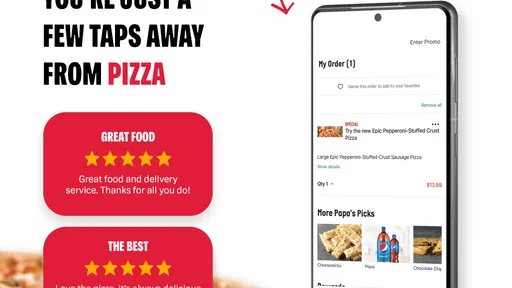
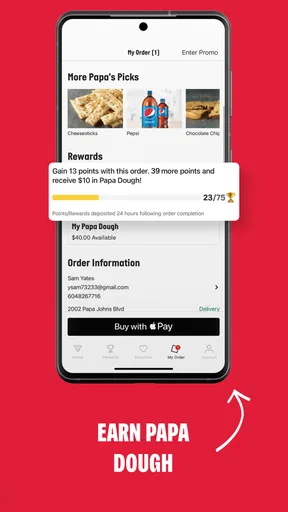
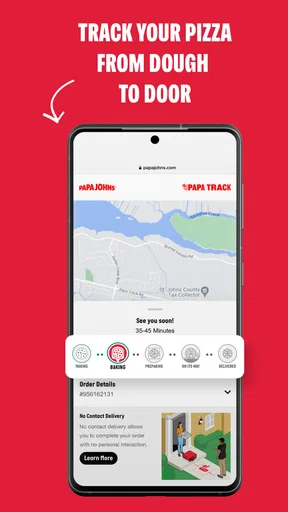
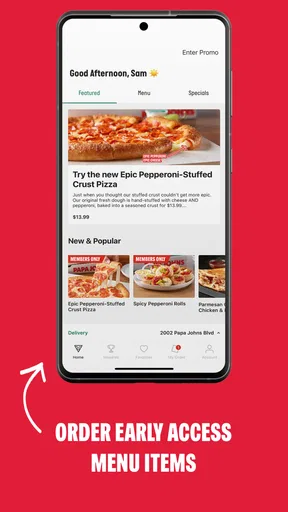
Our Review of Papa Johns Pizza & Delivery
 Analysis by Appyee
Ordering pizza on a phone sounds simple, but the difference between a useful restaurant app and a frustrating one appears when you are hungry, in a hurry, or trying to coordinate food for several people. I spent time with Papa Johns Pizza & Delivery as a Food & Drink app, looking at it less like a digital menu and more like a practical tool for deciding whether ordering directly from Papa John's fits your routine.
My overall impression is straightforward: this is most useful when you already want Papa John's and want a direct way to arrange a delivery or pickup. It is less compelling if your priority is comparing many restaurants in one place. That distinction matters, because the app is not trying to be a general restaurant marketplace. It is the official ordering channel from Papa John's Pizza, the developer behind it, and its value comes from keeping the whole decision inside that one brand.
The app is free and suitable for Everyone, which makes it easy to try without committing money to the download. It has been available since December 19, 2011, and the current version is 5.38.0, with Android support from version 7.0 onward. Those details suggest a long-running product rather than a short-lived experiment, although the experience still depends on how well the local store serves your address.
What I considered before recommending it
I weigh any restaurant app by whether it remains useful after the first convenient order, not just whether it feels easy to try. Here, the key questions are how often you already choose Papa John's, whether a direct ordering route suits your routine, and what you give up compared with browsing several restaurants. That context makes the recommendation more practical than a quick look at the menu alone.
Direct ordering versus restaurant comparison
The first question is not whether the app can help you order pizza. It is whether you want a single-brand experience or a broader comparison tool. If I already know that I want Papa John's, going directly to this app feels more focused than opening a marketplace and filtering through unrelated restaurants. I can concentrate on the menu, the available ordering route, and the address I intend to use.
On the other hand, someone choosing between pizza, burgers, noodles, and local independent restaurants may get more value from a multi-restaurant delivery service. Those alternatives are better suited to discovery and comparison. They can make sense when delivery coverage, total cost, or restaurant variety matters more than ordering from Papa John's specifically.
This app therefore works best as a brand-specific shortcut. It does not replace every kind of food-ordering service. I would decide based on three things: whether Papa John's serves the location, whether I already know what kind of meal I want, and whether I prefer direct ordering over browsing a larger selection.
How the ordering flow fits real life
A realistic use case is a busy evening when I am leaving work, heading home, and need dinner for more than one person. Instead of waiting until everyone is hungry, I can use the app to start the order while commuting or during a short break, then review the choices before placing it. That is more useful than it may sound: planning the order early gives me time to check the address, adjust the selection, and avoid making decisions while people are already waiting.
For a family, the benefit is not only speed. A direct restaurant app can keep the order centered on one menu, which reduces the confusion that comes from switching between several restaurant pages. For a small gathering, it is also easier to think in terms of one pizza order rather than separate meals from different places. The trade-off is obvious: everyone needs to be reasonably happy with that restaurant’s menu.
I also see a practical use for pickup. If I am already near a Papa John's location, ordering ahead through the same app can be more convenient than calling. Pickup is especially sensible when delivery availability is uncertain or when I want to avoid waiting at home. I would still check the final order carefully before leaving, because a digital confirmation is not a substitute for noticing an incorrect size, quantity, or address.
What the app’s reputation tells me
The app has an average rating of 4.8 from around 373 thousand ratings, with roughly 75 thousand written reviews. It has also passed 10 million installs. I would not treat those numbers as a promise that every individual order will be perfect, because restaurant performance varies by location and time. Still, they indicate that a large audience has found the app useful enough to keep using and rating.
For me, the important point is that the app has a substantial user base behind it. That makes it a more credible choice than an obscure restaurant-ordering app with little visible history. It also means expectations are higher: a mature, widely used ordering tool should make basic tasks feel clear, especially when the user is trying to place an order quickly.
Where the official Papa John's app wins
The official app is at its best once you have settled on Papa John's: it keeps the order focused on one restaurant rather than making you sort through unrelated choices. I also value the chance to build a calmer routine around planned meals, such as deciding what the group wants before opening the app and checking the destination before submitting. Those small habits help explain when its directness is a genuine advantage.
A focused experience for people who already know the brand
The strongest advantage is focus. When I want Papa John's, I do not need a catalog of unrelated restaurants competing for my attention. The app keeps the journey centered on that restaurant’s food and ordering process. That can feel calmer than a marketplace interface filled with promotions, categories, delivery filters, and multiple checkout rules.
This focus is particularly helpful for repeat orders. If I tend to choose the same kind of pizza, the app becomes part of a familiar routine rather than a place where I start from zero every time. I can approach it with a clear intention: select the meal, verify the location, and complete the order. The fewer unnecessary decisions I have to make, the more valuable the app becomes.
There is also a trust advantage in dealing directly with the restaurant’s own app. If something about an order needs attention, I am not mentally separating the restaurant from a third-party platform. The ordering channel and the brand are connected in one place. That does not guarantee faster support or perfect fulfillment, but it makes the source of the order easier to understand.
Useful for planned meals, not just emergencies
Many people think of food apps as tools for last-minute hunger, but I find this one more useful when I plan slightly ahead. If I know that dinner will be difficult to prepare, I can arrange the order before the busiest part of the evening. That is a small workflow change with a real benefit: it separates menu decisions from the moment when everyone is asking what is for dinner.
For a household, I would use the app after collecting everyone’s choices, then review the order as a single list. That final review is important. I would check whether each requested item is present, whether the order is for delivery or pickup, and whether the selected location is correct. These checks are simple, but they prevent the most avoidable mistakes in any mobile food order.
For a work lunch or casual group meal, the app can also be practical when one person is coordinating the food. The coordinator can gather preferences first instead of handing a phone around while trying to order. The limitation is that the app does not solve the social problem of choosing one menu for people with very different tastes. It only makes the selected restaurant easier to order from.
Accessibility and device longevity
The Everyone content rating is reassuring for households where different age groups may use the device, although an age label should not be confused with a guarantee that the service suits every child’s independent use. The more relevant point is that the app is presented as a general food-ordering tool rather than entertainment with mature content.
Android users with older phones may also appreciate the stated minimum operating system of 7.0. That gives the app a broad potential device range. Still, an older compatible phone may not feel as responsive as a newer one, particularly when the connection is weak or the device has limited storage. I would keep the app updated where possible, especially because the current version is 5.38.0 and restaurant ordering depends on reliable communication between the app and the store.
Three habits that make the experience better
My first practical tip is to confirm the ordering mode before spending time on the menu. Delivery and pickup are not interchangeable, and choosing the wrong one can create unnecessary changes at the end. I would begin by deciding where I will receive the food, then continue with the meal selection.
Second, I would review the address and order summary before submitting, even if I have used the app many times. This is particularly important when ordering from work, a hotel, a friend’s home, or any place where the device may retain a previous location. A familiar app can encourage automatic tapping, which is exactly when a wrong destination slips through.
Third, I would place group orders only after agreeing on the essentials. It is tempting to build the order while still negotiating toppings and quantities, but that makes mistakes more likely. A quick shared note or message first can make the in-app process much cleaner. This is a small workflow improvement that a store description would never explain, yet it makes a noticeable difference when several people are involved.
When another type of app may fit better
A narrower ordering tool is not always the most useful one, especially when the restaurant itself is still undecided. I would look elsewhere when I need to compare cuisines, accommodate sharply different preferences, or talk through an unusual request with a person. The next distinction is between someone who orders from Papa John's often enough to make a dedicated app worthwhile and someone who would use it only once in a while.
Use a marketplace when comparison is the main goal
If I am undecided about the restaurant, I would probably start with a multi-restaurant delivery app instead. Its main strength is breadth: I can compare different cuisines, restaurants, and delivery choices in one session. That is more suitable for a mixed household, a visitor in an unfamiliar area, or anyone trying to find the best option rather than a specific Papa John's meal.
The cost of that convenience is complexity. Marketplace orders may involve different restaurant pages, separate menus, and platform-specific checkout details. A direct Papa John's app is narrower, but that narrowness is precisely why it can feel faster when the decision has already been made.
Use a browser when you order very rarely
A mobile browser may be enough for someone who orders pizza only once in a while and does not want another app on the phone. That approach avoids installation and keeps the decision temporary. I would choose it if storage is tight, if I am using a shared device, or if I do not expect to order from Papa John's again soon.
The app makes more sense for repeat customers who want a dedicated place for the restaurant’s ordering experience. Installing it has an upfront cost in attention: I need to download it, allow it to occupy space, and remember that it is there. For occasional users, that trade-off may not be worthwhile.
Use a phone call when the order is unusual
For a straightforward order, an app is usually easier for me than speaking every detail aloud. However, an unusual request, a complicated delivery situation, or a question that needs a human answer may make a phone call more appropriate. A call lets me explain context in my own words, while an app guides me through the choices it presents.
I would not treat the app as a replacement for every conversation with a store. It is a structured ordering tool. That is its strength when the order fits the available flow, and its weakness when the situation falls outside that structure.
Who should skip it
I would skip this app if I regularly want to compare several restaurants before choosing dinner. I would also hesitate if Papa John's is not one of my preferred options, because a single-brand app offers little benefit when I have no intention of ordering from that brand.
People with very limited phone storage may prefer a browser, and users who dislike managing apps may find a direct call simpler. I would also avoid relying on it as the only plan for an important event. For a birthday, office gathering, or time-sensitive meal, I would place the order with enough margin to handle local delays or a needed correction rather than assuming the app can remove every real-world variable.
The real cost of switching to it
Switching from a marketplace to the Papa John's app is not difficult, but it changes how I make decisions. I lose the convenience of comparing many restaurants in one place, while gaining a more direct route to one specific brand. The right choice depends on which of those tasks I perform more often.
There is also a habit cost. With a marketplace, I may be used to seeing several restaurants, delivery estimates, and menu styles together. Moving to this app means accepting a narrower starting point. In return, repeat orders can become less mentally demanding because I am not browsing an entire local food scene every time I want pizza.
The financial side should be judged at checkout rather than by assuming that one channel is always cheaper. The total can depend on the order, location, delivery choice, and any offers or charges shown during the process. I would compare the final amount and the convenience, not just the app’s free download. Free installation does not automatically mean the meal itself costs less through one route.
Privacy and notification preferences are another personal trade-off whenever I install a restaurant app. I would review the phone’s permission and notification controls and keep only what I find useful. Someone who wants reminders about ordering may accept more alerts; someone who orders occasionally may prefer a quieter experience. This is not a reason to reject the app, but it is part of making it fit comfortably into daily phone use.
For Android owners, compatibility is relatively broad because the app supports version 7.0 and later. Yet compatibility is not the same as a smooth experience on every device. If the phone is old, the connection unstable, or the operating system heavily modified, I would keep the browser or phone option available as a backup. That is especially sensible when ordering for guests who cannot afford a last-minute delay.
My recommendation for different kinds of users
My recommendation depends less on how often someone uses food apps generally and more on whether Papa John's is already a regular choice. Repeat customers and groups who can agree on one restaurant are likely to get the most lasting value; occasional customers may be better served by a browser or a broader ordering option. I would also keep another way to order in mind for situations where the app's structured flow does not suit the request.
Best for repeat Papa John's customers
I recommend it most clearly to people who already choose Papa John's with some regularity. The app gives them a direct, focused route to a familiar restaurant, whether the plan is delivery at home or pickup on the way somewhere else. The free download lowers the barrier to trying it, and the large install base and strong average rating make it a credible option rather than an untested experiment.
My advice for repeat users is to create a simple routine around it: decide the order before opening the app, verify the location first, review the complete summary, and leave enough time for the restaurant to prepare and deliver it. That routine uses the app for what it does well without expecting it to solve every part of the meal-planning process.
Good for families and small groups with one restaurant preference
I also recommend it for families or small groups that can agree on Papa John's. The app can reduce the back-and-forth involved in coordinating one shared order, especially when one person is responsible for placing it. The key is to collect everyone’s choices before starting and to check quantities carefully at the end.
It is less suitable for groups with sharply divided preferences. If half the table wants pizza and the other half wants entirely different food, a marketplace may be the more practical compromise. The best app is the one that matches the group’s decision, not necessarily the one with the most direct brand connection.
Only a conditional recommendation for explorers
If you enjoy discovering new restaurants, I would not make this your primary food app. It can still be useful when Papa John's becomes the chosen restaurant, but it is not the tool I would open first for broad local comparison. A marketplace or browser search is better for exploration, while this app is better for execution after the choice has been made.
After using it, I see Papa Johns Pizza & Delivery as a practical specialist rather than an all-purpose food platform. It offers a focused way to order from Papa John's Pizza, and that focus is its main advantage and its main limitation. Choose it when the restaurant is already part of your plan; choose an alternative when discovering, comparing, or customizing across many restaurants matters more.
For my own use, I would keep it available if I ordered from Papa John's repeatedly, particularly for planned family dinners or convenient pickup. I would not depend on it as my only food-ordering option, and I would always review the final order before submitting. Used with those expectations, it is a sensible free app for Android users who value a direct ordering path over a wider restaurant marketplace.
Privacy and Permissions
See what permissions an app requests and how it handles your data.
- Location
- approximate location (network-based), precise location (GPS and network-based)
- Phone
- read phone status and identity
- Camera
- take pictures and videos
- Microphone
- record audio
- Device ID & call information
- read phone status and identity
- Other
- view network connections, full network access, run at startup, prevent device from sleeping, read Google service configuration
Verdict
Strengths of Papa Johns Pizza & Delivery
- Easy ordering through the app with a clear, user-friendly layout.
- Real-time order tracking helps you follow delivery progress.
- Frequent coupons and meal deals can reduce the total cost.
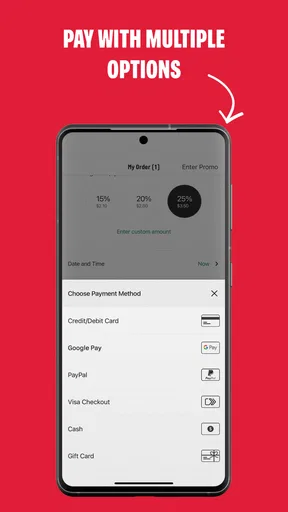
- Multiple payment methods make checkout quick and convenient.
- Menu includes customizable pizzas, sides, desserts, and drinks.
Limitations of Papa Johns Pizza & Delivery
- Deals and menu availability may vary by location.
- Delivery fees and service charges can increase the final price.
- Some features require location access to find nearby stores.
- Busy periods may lead to longer delivery estimates.
- App performance and ordering options can differ by country.
Similar Picks in This Category
View All
Rappi: Food Delivery, Grocery
Rappi, Inc - Delivery3.5

McDonald’s: Cupons e Delivery
Arcos Dorados4.3

Swiggy: Food Instamart Dineout
Swiggy4.7

Blinkit: Groceries & more
Blinkit4.8

foodpanda: food & groceries
Foodpanda GmbH a subsidiary of Delivery Hero SE4.0

Zomato: Food Delivery & Dining
Zomato4.7
Frequently Asked Questions
What can I do with the Papa Johns Pizza & Delivery app?
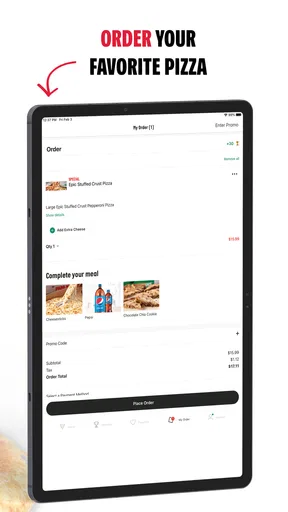
The Papa Johns Pizza & Delivery app lets you browse the available menu, customize pizzas and other items, add sides and drinks, and place an order for delivery or carryout. You can usually select a nearby restaurant, review estimated preparation and delivery times, save favorite orders, and manage your account. Menu items, ordering features, and availability may vary by location.
Can I customize my pizza and choose specific toppings in the app?
Yes, the app generally allows you to customize a pizza before adding it to your cart. Depending on the selected product and restaurant, you may be able to choose the size, crust, sauce, cheese, toppings, and quantity. You can also adjust certain specialty pizzas, although some combinations or modifications may not be available. Always review the final item details and price before checkout.
Does the Papa Johns app offer delivery tracking and carryout ordering?
The app supports delivery and carryout ordering at participating Papa Johns locations. For delivery orders, tracking or status updates may be available after the restaurant accepts the order, but the level of detail can differ by store and region. Carryout users can typically select a nearby location and choose a pickup time. Estimated times are not guaranteed during busy periods.
What payment methods and promotions are available through the app?
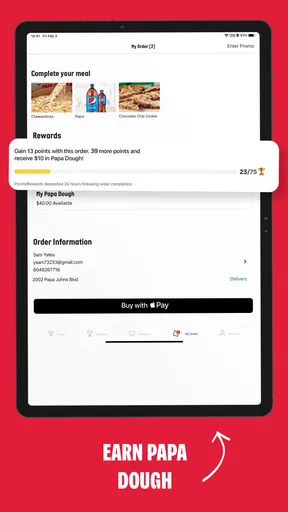
Payment options can include major credit or debit cards, digital wallets, gift cards, and other methods supported in your region. The app may also display coupons, meal deals, rewards, and location-specific promotions. Offers often have conditions such as minimum order values, eligible products, or limited dates. Check the promotion details carefully, since discounts may not always combine.
Do I need an account to order from Papa Johns Pizza & Delivery?
An account may not always be required to place an order, depending on the app version and your location, but registering can make the experience more convenient. Account features may include saved addresses, stored payment details, order history, favorite items, and access to rewards or personalized offers. If you prefer not to register, review the checkout options to see whether guest ordering is supported.
